A couple of changes went live this week that will improve how SiteVitals tracks and surfaces problems across your websites. On their own they might seem like small quality-of-life improvements. But they're part of a bigger picture, so I wanted to explain what changed and where we're heading.
Events are now stored individually
Until recently, when SiteVitals ran its checks and found problems, it would group related issues together into a single timeline entry. So if a site had three missing SEO meta fields, they'd land as one event. If two security headers were absent, one entry.
The intention was to keep the timeline clean. The result was that it became harder to do anything useful with the data.
The problem showed itself when I started thinking seriously about allowing you to resolve individual issues. With grouped events, you'd either have to resolve everything in the group together or nothing at all. You couldn't say "I've fixed the missing meta description, but the canonical issue is still on my list." The data model just didn't support it.
So events are now stored individually. Each distinct issue gets its own record — its own first-seen date, its own status, its own resolution. The timeline might look slightly busier for sites with multiple problems, but what you're seeing is more honest. Every item is something specific that happened, and soon, every item will be something you can act on and mark as resolved. Better still, the system should now be able to track the resolved status for you. If you fix it on your site, it should reflect this in the event on the timeline. This will make tracking how long events have hung around for without being 'fixed' much easier, and provide much richer data down the road.
This was a deliberate architectural decision rather than a cosmetic one, and it was the prerequisite for everything else I want to build on top of it.
A new portfolio view on the timeline
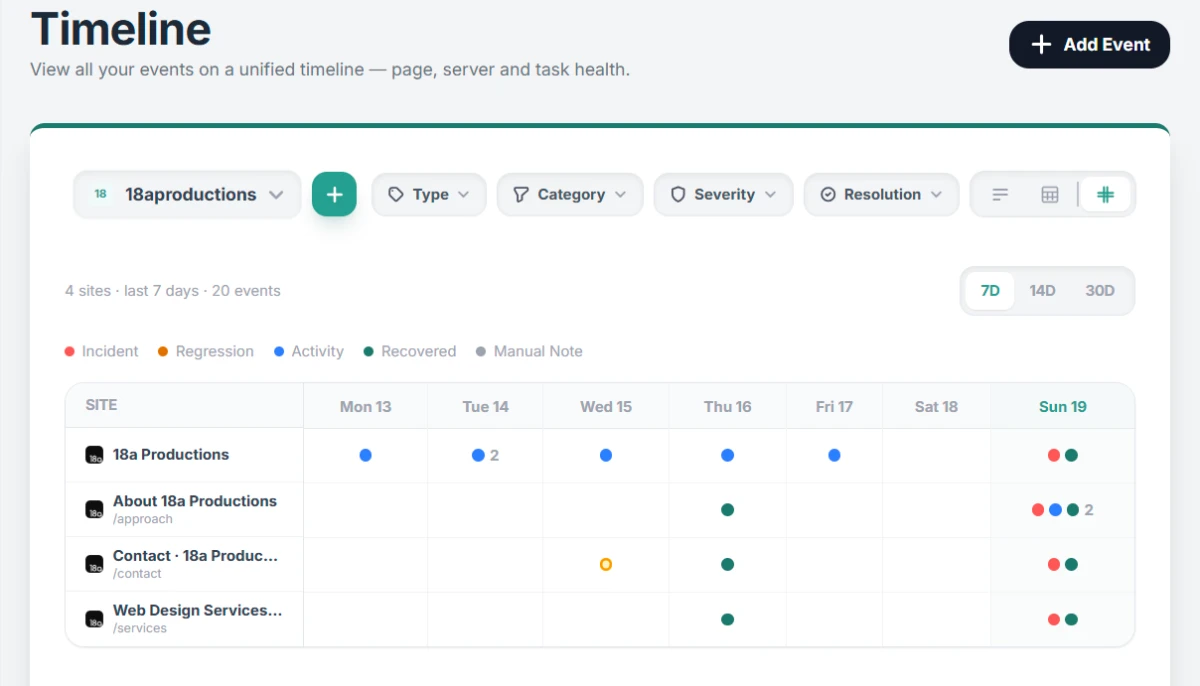
The second change is the portfolio view — a new way of looking at your timeline that spans your entire portfolio rather than a single site.
Rather than a traditional list feed, it's a calendar grid. Your sites run down the left-hand side, and the days of the week run across the top. Each cell shows what happened on that site on that day, colour-coded by event type: red for incidents, amber for regressions, blue for activity, green for recoveries, and grey for manual notes. Where multiple events happened on the same day, they stack so nothing gets lost.
You can switch between 7, 14, and 30-day windows depending on how much history you want to see, and filter by type, category, severity, or resolution status across the whole portfolio at once.
For agencies managing client sites, this should immediately feel useful. At a glance you can see whether a quiet week really was quiet, or whether several sites were quietly degrading in ways that never triggered an alert. A row of amber dots drifting across a site over two weeks tells a very different story to a sudden red incident — and now you can see both patterns in the same view.
Why this matters: the weekly digest
Both of these changes are laying the groundwork for something I've been building towards: a weekly portfolio digest email.
The idea is straightforward. Every Monday morning, you get a summary of what happened across your portfolio in the past week — not just "x sites need attention" but something genuinely useful: which sites changed, what kind of changes, what's improved, and what's still open. Alongside that, you'll get a prioritised list of suggested jobs for the week based on the regressions, performance changes, and alerts we've spotted while watching your portfolio that week. Where relevant, it'll also surface billable opportunities on client sites. A ready-made reason to fire off an email, or if you're a phone person, to pick up the phone.
For that email to be meaningful, the underlying data needs to be precise. If events are grouped, the digest becomes vague. If there's no concept of an issue being resolved, the digest can't tell you what was fixed versus what's still outstanding. The individual event model solves both of those things.
The portfolio timeline is essentially a visual version of what the digest will contain — the same data, presented in the app rather than your inbox.
I'll share more about the digest as it takes shape. In the meantime, both of these changes are live now. If you have sites being monitored, your timeline will already look different — take a look and let me know what you think.

By Tom Freeman · Co-Founder & Lead Developer
Full-stack developer specialising in high-performance web applications and automated monitoring.
Share this post
Stay in the loop
Get new posts delivered to your inbox. No spam, unsubscribe any time.