Page Performance Monitoring

Your site might be slowing down. You probably wouldn’t know.

Performance rarely fails suddenly - it degrades gradually. A plugin update here, an uncompressed image there, a third-party script that takes a little longer than it used to. Each change is small. The cumulative effect on your rankings and your visitors is not. SiteVitals monitors Core Web Vitals continuously and alerts you when something actually matters.

Powered by Google PageSpeed Insights - the same data Google uses for ranking signals

Generate your instant page speed report

No account needed. Results in about a minute.

Free Performance Snapshot

Google PageSpeed data, translated into plain English.

Google PageSpeed Insights is a genuinely powerful tool. It is also one that produces a large volume of metrics, scores, and opportunities - many of which vary wildly in importance depending on the context, and some of which are informational rather than actionable. Without experience interpreting the output, it can be genuinely hard to tell which numbers matter and which ones to ignore.

Our free speed test uses the same PageSpeed data and translates it into clear, prioritised guidance: which issues matter, why they matter, and what to fix first. No raw metrics dump. No unexplained scores. Just a practical view of where your performance actually stands and what is worth doing about it.

It is a snapshot - a single moment in time. It tells you where things stand right now, which is useful for identifying obvious bottlenecks or validating a recent change. What it cannot tell you is how performance is trending, or whether last week’s plugin update quietly made things worse. That is what continuous monitoring is for.

🔎

Clear, actionable performance advice

Transforms raw PageSpeed and Core Web Vitals data into plain-English explanations and practical recommendations - not a list of metrics with no context.

🎯

Prioritised fixes, not noise

Highlights the issues most likely to affect user experience or search visibility. A lot of PageSpeed warnings are informational - we surface the ones worth actually acting on.

📈

A clear baseline to build from

Gives you a performance baseline you can reference when assessing changes, making the case for improvements, or deciding whether continuous monitoring is worth setting up.

📝

What to do with the results

Each issue comes with a clear explanation of what it is, why it matters, and how to address it. Hand it to a developer or work through it yourself - it is designed to be useful either way.

Why a Snapshot Is Only the Start

Performance degrades gradually.
A one-time test misses that entirely.

Modern websites are never finished. Every design tweak, plugin update, content addition, or server change is an opportunity for performance to shift - usually not dramatically, and usually not immediately noticed. A page that scored 82 six months ago might be scoring 61 today, with no single obvious cause and no alert that anything changed.

The problem is that gradual degradation feels normal. If performance slips a little every month, there is no moment where it obviously breaks - just a slow accumulation of slightly slower pages, slightly higher bounce rates, and slightly worse Core Web Vitals scores, each feeding into the next.

“Technical performance issues remain one of the top reasons websites lose organic traffic - and they are often the last thing site owners think to check.”

- Search Engine Journal, 2025

Continuous monitoring means SiteVitals measures your pages regularly, compares results against your established baseline, and alerts you only when a meaningful regression occurs - not on every minor fluctuation, but when something has genuinely shifted in a way that could affect users or rankings.

🔌

The plugin update that added 2 seconds

A routine plugin update introduces a heavier JavaScript bundle. Load times increase noticeably. Without continuous monitoring, this surfaces three months later when someone mentions the site “feels slow” - at which point attributing it to the right cause requires significant investigation.

📷

The image that should have been compressed

A new team member uploads a 4MB hero image directly from their camera. The page LCP score drops significantly. With continuous monitoring, this is flagged the same day. Without it, visitors experience the slower page until someone happens to run a manual test.

🆕

The third-party script that got heavier

A chat widget or analytics tool updates its script. The new version is larger and blocks more of the page load. Your Total Blocking Time increases and your performance score drops. You did not make any changes - but your visitors feel the difference.

📍

The layout shift nobody noticed

A font loading change causes content to jump as the page settles. The Cumulative Layout Shift score increases. Users start clicking the wrong things by accident. It is the kind of issue that produces no error, no complaint, and no obvious sign - just a slightly worse experience for every visitor.

How It Works

Continuous monitoring.
Without the alert fatigue.

Performance scores fluctuate naturally. SiteVitals filters the noise and only tells you when something has meaningfully changed - so you get useful alerts, not a constant stream of minor variations.

Step 01

Continuous scanning

SiteVitals monitors your Core Web Vitals and performance scores around the clock. Every scan is stored so changes can be tracked against your established baseline over time.

01
Step 02

Smart filtering

Our engine ignores minor natural fluctuations and only flags regressions that represent a meaningful degradation in user experience or performance score - not every small blip.

02
Step 03

Actionable alert

When a real regression is detected, you get an alert with a clear breakdown of what shifted, by how much, and what to look at first - not just a number that has changed.

03

See SiteVitals in action

No screenshots here. This is a live, interactive report showing exactly how we monitor performance.

sitevitals.co.uk/report/demo

What we check

We track over 40 individual performance signals. Here are the key indicators we use to safeguard your user experience.

Loading Speed

Performance Score

A single, weighted summary of your site's overall health and speed.

Largest Contentful Paint

Measures when the main content is visible. Vital for perceived speed.

Server Response (TTFB)

Tracks how fast your hosting responds to a visitor's request.

Interactivity

Total Blocking Time

Identifies scripts that "freeze" your page while loading.

Cumulative Layout Shift

Ensures buttons and text don't "jump" around while loading.

JS Execution Time

Detects heavy third-party scripts slowing down your site.

Optimisation

Image Compression

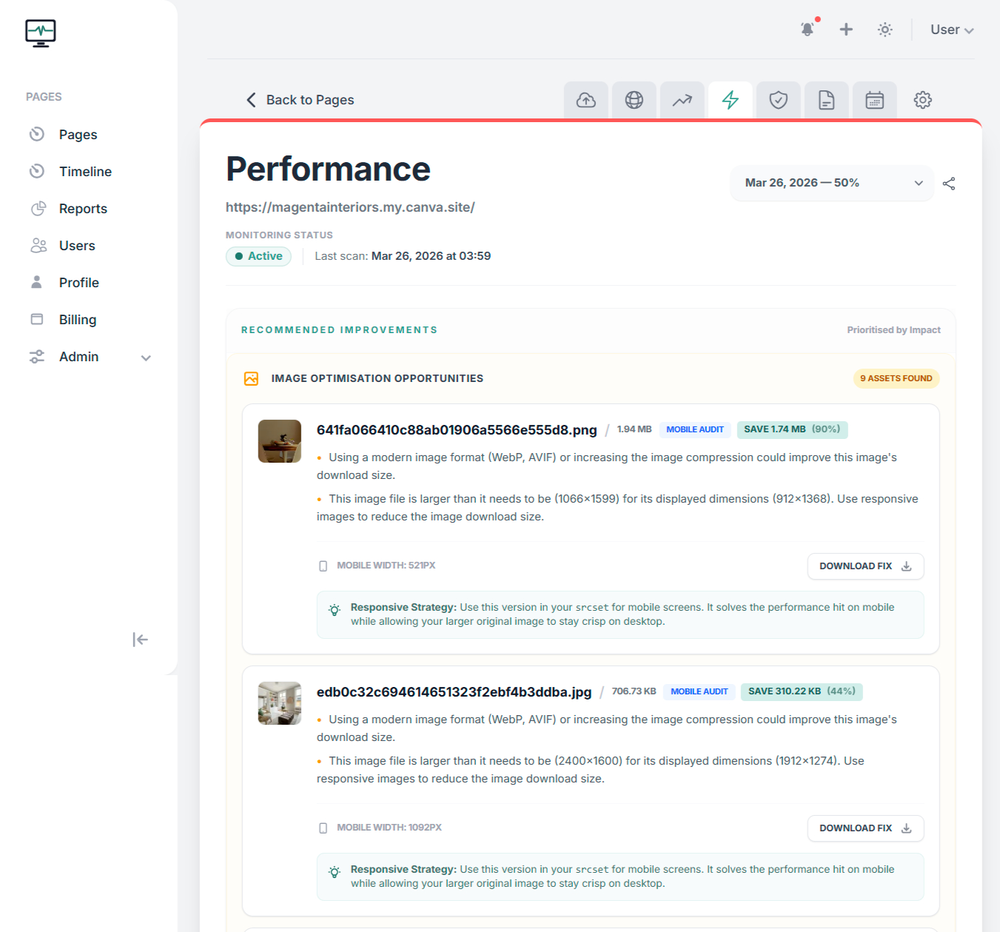
Finds oversized images that should be converted to WebP or AVIF.

Caching Efficiency

Checks if your assets are stored correctly for repeat visitors.

Accessibility Score

Ensures your site is usable for everyone, helping SEO and UX.

Plus: Unsized images, Render-blocking resources, TBT, FCP, and 30+ other technical audits.

Why Performance Matters

Slow pages cost you
more than you probably think.

The relationship between page speed and business outcomes is well-documented at this point. A one-second delay in page load time reduces conversions by an average of 7%. Google has used Core Web Vitals as a ranking signal since 2021. Pages that feel unresponsive or unstable have measurably higher bounce rates regardless of how good the content is.

But the more insidious problem is that performance degradation is invisible until it is not. Nobody wakes up to find their site suddenly slow. It happens gradually - a little worse each month, each update, each additional tool added to the stack - until one day a benchmark shows it is half the score it was a year ago.

Continuous monitoring does not just protect your rankings. It protects the work you have already put into making your site fast - by catching the regressions before they have time to compound.

📈

Performance & SEO rankings

Core Web Vitals are a confirmed Google ranking signal. Pages with poor LCP, CLS, or INP scores are at a disadvantage in competitive search results, independent of content quality.

💸

Performance & conversions

A one-second delay in page load time reduces conversions by an average of 7%. For ecommerce and lead-generation sites, the cost of a slow page is directly measurable in lost revenue.

📱

Performance on mobile

Mobile network conditions vary enormously. A page that performs acceptably on a fast connection can feel unusable on a slower one. Core Web Vitals measure real-world performance across actual user conditions.

The compounding problem

Performance issues compound. Each new plugin, each unoptimised image, each additional script adds to what is already there. Without monitoring, this accumulation is invisible until the site is noticeably worse than it was.

Don't let your website performance slowly degrade

Modern websites are never “finished.” With every design tweak, plugin update, or server change, performance can shift - often without warning. SiteVitals continuously monitors these changes so you don’t have to. We detect real regressions, filter the noise, and alert you only when your user experience or search visibility could be affected.

Stop wondering whether your site is slowing down. Know for sure. Fix issues before customers notice.

Performance You Can Depend On
Questions

Things people often ask us.

If something is not covered here, we are genuinely happy to answer it. We are a small team and we actually respond.

Is the free test just a raw PageSpeed Insights report?

No - and this is an important distinction. The underlying data comes from Google PageSpeed Insights, which is the right data to use. But PageSpeed Insights produces a large volume of metrics, scores, and opportunities, many of which are hard to interpret without experience. Our free test takes that data and translates it into clear, prioritised, plain-English guidance - explaining what each issue means, why it matters, and what to fix first. It is the same data, made useful.

What are Core Web Vitals and why do they matter?

Core Web Vitals are Google’s set of standardised measures for real-world user experience: Largest Contentful Paint (how quickly the main content loads), Interaction to Next Paint (how responsive the page feels to user input), and Cumulative Layout Shift (how stable the layout is while loading). They matter for two reasons: they are a confirmed Google ranking signal, and they correlate directly with measurable user outcomes like bounce rate, engagement, and conversion.

Will I get alerted every time my performance score changes?

No. Performance scores fluctuate naturally from scan to scan due to network conditions and measurement variance - this is normal and not worth alerting on. SiteVitals uses smart thresholds to distinguish between natural variation and genuine regressions. You get an alert when something has meaningfully degraded in a way that is likely to affect users or rankings - not every time a score moves by a point.

Can slow performance affect my SEO rankings?

Yes. Google has used Core Web Vitals as a ranking signal since the Page Experience update in 2021, and the weighting has increased since then. Pages with consistently poor LCP, CLS, or INP scores are at a disadvantage in competitive search results, independently of their content quality. Performance is not the only ranking factor - but it is one of the few you can directly control and monitor.

How does continuous monitoring differ from running tests occasionally?

The key difference is that performance degrades gradually, not suddenly. A plugin update, an unoptimised image upload, or a heavier third-party script can each make a small difference individually - but together, over time, they compound into a significantly slower site. Continuous monitoring catches these regressions as they happen, so you can address them individually while they are small.

Does performance monitoring require installing anything on my site?

Nothing at all. SiteVitals monitors your pages externally, using the same approach Google uses when it assesses your site. No plugins, no scripts, no changes to your codebase. There is no risk of the monitoring itself affecting your performance scores.

My scores change between tests. Is that normal?

Yes. External factors like server load, network congestion, and even the device being simulated can cause slight variations in scores. This is why a single test is just a snapshot; continuous monitoring looks at the trend over time to filter out the noise and show you the true performance of your site.

Find out how your site is actually performing right now.

The free speed test takes about a minute and requires no account. You will get a clear, prioritised picture of where your performance stands - and what, if anything, is worth doing about it.