Task Monitoring

Failed jobs don't
produce errors.
They just stop working.

A cron job that fails silently is a problem you find weeks later, when you notice the backups haven't run, the reports are stale, or the database cleanup that was supposed to happen every night hasn't happened in a month.

Available on Marketer from £36.00/mo
🔔
Missed job detection
If your job doesn't check in within its expected window plus grace period, SiteVitals alerts you immediately — before you've noticed the consequences.
🚨
Explicit failure reporting
Jobs can report failure directly via the /fail endpoint, triggering an immediate alert without waiting for a missed schedule.
⏱️
Start and finish tracking
Send a /start ping before the job begins. SiteVitals calculates actual runtime automatically and can detect stuck jobs that started but never finished.
📊
30-day statistics
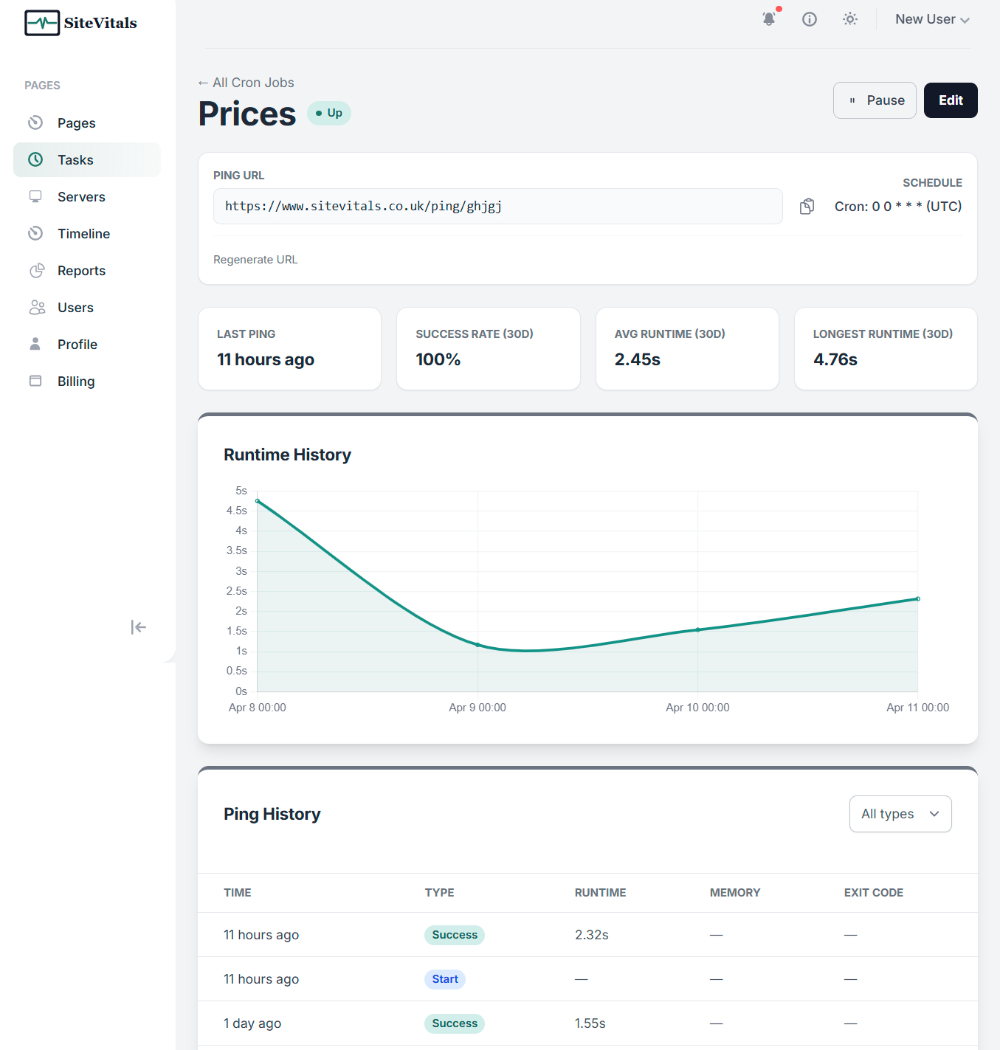
Success rate, average runtime, max runtime, and a runtime chart on each monitor's dashboard — so you can spot performance regressions over time.
🔒
Regenerable ping URLs
If a ping URL is ever compromised, regenerate it instantly. The old URL stops working immediately.
The Silent Failure Problem

No error. No alert.
Just silence.

When a web request fails, you get a 500 error. When a database goes down, something throws an exception. When a cron job fails to run — nothing. No error, no log entry you'd think to look for, no alert. The job simply doesn't happen, and the world carries on as if it did.

This is the nature of scheduled tasks. They're designed to run in the background, unattended. That's their value — and their risk. The only way to know a cron job ran is to check whether it checked in.

SiteVitals task monitoring works on the dead man's switch principle: your job pings a URL when it completes. If SiteVitals doesn't receive that ping within the expected window, it assumes the job didn't run — and tells you immediately, not weeks later.

💾

The backup that stopped running

Your nightly database backup runs at 2am. In January, a permissions change broke it. You discovered this in March, when you needed to restore something. Three months of backups — gone, silently.

📧

The email queue that backed up

A queue worker processes outbound emails. The worker exits unexpectedly and isn't restarted. Emails sit queued. Users don't receive confirmations, password resets, or order notifications. Support tickets start arriving.

📊

The report that was never generated

A weekly report runs every Monday morning and emails the management team. A PHP version change broke it silently. Three weeks of meetings happened without anyone realising the data was stale.

🗑️

The cleanup that never ran

A daily cleanup job deletes old temporary files and expired sessions. It stops running after a deployment. Disk usage climbs slowly. Six weeks later, the disk is full and everything goes down at once.

How It Works

One URL per job.
That's the integration.

Nothing to install, no agent to configure, no infrastructure changes. Each monitor gets a unique ping URL. Add a curl call to the end of your job. SiteVitals handles everything else.

1

Create a monitor

Add a task monitor and configure how often the job should run and how much lateness you'll tolerate before an alert fires.

  • Name the job for your own reference
  • Set expected interval or full cron expression
  • Configure the grace period tolerance
2

Copy the ping URL

Each monitor gets a unique URL based on an 8-character slug. This is the address your job will call when it completes successfully.

  • Unique URL per job
  • GET or POST — both accepted
  • No authentication beyond the slug itself
3

Add a curl call to your job

At the end of your cron job or scheduled task, add a single line that pings the URL. Optionally send a /start ping before the job begins to track runtime.

  • Works with bash, PHP, Python, Node, Ruby — any language
  • Only ping on success — failed jobs stay silent
  • Use /start before and /success after to measure duration
4

SiteVitals watches the clock

If a ping doesn't arrive within the expected window plus grace period, SiteVitals opens an incident and alerts you. When the job runs again, a recovery notification is sent.

  • Email, Slack, webhook, or in-app notification
  • Alert fires as soon as the window expires
  • Recovery alert sent automatically on next successful ping

Example — adding a ping to a bash cron job

# /etc/cron.d/my-backup
# Run backup at 2am every day, ping SiteVitals on success
0 2 * * * root /usr/local/bin/backup.sh && curl -fsS --retry 3 https://sitevitals.co.uk/ping/your-slug
The && means the ping only fires if the backup exits successfully. A failed backup stays silent — and SiteVitals alerts you when the ping doesn't arrive within the expected window.
# With start/finish tracking and explicit failure reporting
# Send /start before the job, /fail on error
curl -fsS https://sitevitals.co.uk/ping/your-slug/start

/usr/local/bin/backup.sh

if [ $? -eq 0 ]; then
  curl -fsS https://sitevitals.co.uk/ping/your-slug
else
  curl -fsS https://sitevitals.co.uk/ping/your-slug/fail
fi
Using /start lets SiteVitals measure actual runtime and detect stuck jobs. Using /fail triggers an immediate alert without waiting for the missed-window timeout.
Ping Endpoints

More than just
a success ping.

Each monitor supports four endpoints. All accept GET and POST requests — except /log which is POST only. No authentication required beyond the URL slug itself.

Success GET or POST
/ping/{slug}

Job completed successfully. Resets the missed-window timer. This is the most common ping.

Start GET or POST
/ping/{slug}/start

Send before the job begins. SiteVitals records the start time and calculates duration automatically when the success ping arrives.

Failure GET or POST
/ping/{slug}/fail

Job failed. Triggers an immediate alert without waiting for the missed-window timeout. Use when you can detect failure explicitly.

Log POST only
/ping/{slug}/log

POST job output for diagnostic context. Useful when something goes wrong and you want the log output available alongside the incident.

Common Use Cases

If it runs on a schedule,
it should be monitored.

Task monitoring works with anything that can make an HTTP request — bash, PHP, Python, Ruby, Node, Laravel Scheduler, GitHub Actions, Jenkins, and others.

💾

Database backups

The most critical scheduled task on most servers. Know within minutes if the nightly backup didn't complete.

📧

Email queue processing

Queue workers that process outbound emails, notifications, or transactional messages.

🔄

Data sync jobs

Imports, exports, and synchronisation jobs that feed data between systems.

📊

Report generation

Weekly, monthly, or daily reports that stakeholders rely on being current and accurate.

🗑️

Cleanup and maintenance

Log rotation, temp file deletion, expired session cleanup, and other housekeeping that keeps servers healthy.

🔍

Search index updates

Jobs that rebuild or update search indexes, keeping results current.

💳

Payment and billing runs

Subscription renewals, invoice generation, and payment retry jobs that must not silently fail.

🌐

API data fetches

Scheduled pulls from third-party APIs that populate your own data.

🚀

Deployment tasks

Post-deploy jobs, cache warming scripts, and any automation that runs after a release.

Silent failures, loudly reported.

Get started with our free tools today. When you're ready for continuous cron_monitoring monitoring, our plans are simple, transparent, and built for sites of all sizes.

Plans start from
£36.00/mo
View All Plans & Features
Questions

Things people often ask us.

If something is not covered here, we are genuinely happy to answer it. We are a small team and we actually respond.

How does task monitoring work?

Each monitor gets a unique ping URL. Add a curl call to the end of your scheduled job — when it completes successfully, it hits the URL. If SiteVitals doesn't receive a ping within the expected window plus grace period, it opens an incident and fires an alert.

Do I need to install anything on my server?

No. Task monitoring is entirely based on outbound HTTP pings from your job to SiteVitals. There's nothing to install — just a single curl call added to your existing script.

What is the /fail endpoint for?

If your job can detect its own failure, you can hit the /fail endpoint to trigger an immediate alert without waiting for the missed-window timeout. This is useful when you know the job failed and want to be notified right away rather than after the grace period expires.

What is the /start endpoint for?

Send a /start ping before your job begins. SiteVitals records the start time and calculates actual runtime when the success ping arrives. This also lets SiteVitals detect stuck jobs — ones that started but never sent a success or fail ping.

What is a grace period?

A grace period is a tolerance window added to the expected run interval. If your job runs hourly and you set a 5-minute grace period, SiteVitals waits 65 minutes before alerting. This accommodates minor timing variation without generating false alarms.

What happens when a job recovers?

When a ping arrives after a missed window, SiteVitals closes the incident and sends a recovery notification to the same channels that received the initial alert.

Can I use cron expressions for complex schedules?

Yes. You can define your schedule using a simple interval (every 5 minutes, every hour, every day) or a full cron expression for more complex patterns.

Does it work with Laravel Scheduler, GitHub Actions, or other task runners?

Yes. Anything that can make an HTTP request works — bash, PHP, Python, Ruby, Node, Laravel, GitHub Actions, Jenkins, and others. As long as your job can call a URL when it completes, it can be monitored.

Can I pause monitoring without losing history?

Yes. Monitors can be paused and resumed without deleting the monitor or its history. Useful during planned maintenance windows when you know a job won't run.

How many task monitors do I get?

This depends on your plan. The Starter plan includes 5 monitors, Marketer includes 15, and the Agency plan includes 30. Contact us if you need more.

Know when your jobs run. Every time.

One URL per job. One curl call. SiteVitals handles the alerting, the history, the runtime tracking, and the recovery notifications automatically.