
CPU
Average utilisation across all cores, with sustained warning and critical thresholds.
75% warning · 90% critical · 5 min sustain
Server monitoring
Uptime checks tell you whether your site responds. They don't tell you that your server is running at 95% memory, that MySQL has been restarting every few minutes, or that your disk is nearly full. SiteVitals server monitoring installs with one command and alerts you when a problem lasts, not every time something spikes for a moment.
Available on Marketer from £36.00/month.
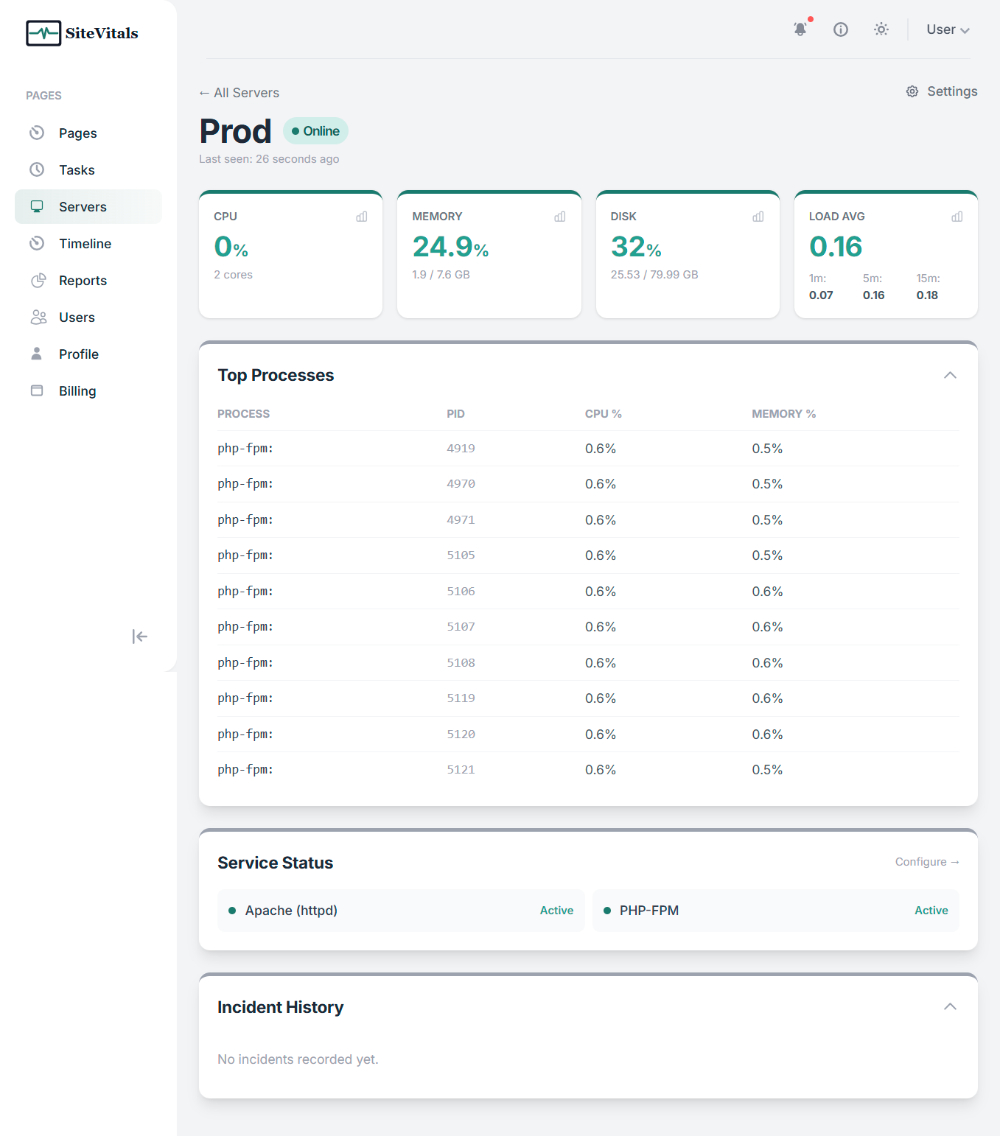
What we monitor
A lightweight agent reports once a minute over HTTPS. It uses under 0.3% CPU per run and around 1.5 MB of network traffic per day.
The important bit
CPU and memory spikes are not treated as incidents straight away. SiteVitals waits to see whether the problem lasts, so a normal burst of activity does not become an alert.
Average utilisation across all cores, with sustained warning and critical thresholds.
75% warning · 90% critical · 5 min sustain
RAM usage in percentage and GB, with swap tracked separately so slow memory pressure is visible early.
75% warning · 90% critical · 5 min sustain
Root filesystem usage in percentage and GB. Disk problems alert immediately because a full disk rarely fixes itself.
75% warning · 90% critical · immediate
1, 5 and 15 minute load averages, normalised against CPU core count so thresholds make sense across different server sizes.
1m · 5m · 15m · per-core normalised
The busiest processes by CPU are captured with each check, including PID, CPU and memory use, so you can see what was consuming resources.
Captured every check · shown with incidents
Monitor nginx, Apache, MySQL, Redis, PHP-FPM, Supervisor and other discovered services individually.
Auto-discovery · crash-loop detection · immediate alerts
If the server stops reporting for more than 10 minutes, SiteVitals opens an offline incident and alerts your configured channels.
10 min threshold · recovery alert
How it works
There is no persistent daemon and nothing listening for inbound connections. The agent runs every minute via systemd or cron, sends its readings securely to SiteVitals, then exits.
Create a server in SiteVitals and copy the generated install command. The API key in that command is scoped to that server only.
Usually less than a minute.
Paste the command on the server as root. The installer configures systemd or cron, runs its first check and discovers the services already running.
Tested on Ubuntu, Debian, Amazon Linux, CentOS and AlmaLinux.
SiteVitals shows the services it found. Recommended ones are pre-selected, and you decide which should be watched.
You can re-run discovery after installing new software.
Choose warning and critical thresholds, how long a breach must last, and who should be told. Different channels can have different escalation delays.
Email, Slack, webhook and in-app alerts are supported.
An uptime check confirms your server responded. It doesn't know that the response took three times longer than usual because your database is under pressure. It doesn't know that your disk is 97% full and the next log rotation will bring everything down. It doesn't know that PHP-FPM has restarted eleven times this hour.
Server monitoring gives you the view from inside, the resource utilisation, the process health, the service status, that external checks fundamentally cannot provide. Uptime monitoring tells you when your site goes down. Server monitoring tells you why, and warns you before it happens.
And when something does go wrong, having a minute-by-minute record of what was happening, CPU at 94%, MySQL restarting, load spiking, means you spend time fixing the problem rather than reconstructing what caused it.
Log files grow. Backup scripts run. Uploads accumulate. Disk fills gradually and then all at once, taking down databases, mail servers, and application writes simultaneously. Disk alerts fire immediately with no sustain delay, giving you time to act.
MySQL or PostgreSQL restarting repeatedly is often the first sign of a memory exhaustion problem, a corrupted table, or a runaway query. The site may still respond, slowly. Service monitoring catches this pattern before visitors notice.
A brief high CPU reading is noise. Ten minutes of sustained high load is a problem. Sustained breach detection means you only get alerted when something is genuinely wrong, not every time a cron job runs.
A queue worker stops processing. A cache server goes down and requests start hitting the database directly. A mail relay stops accepting connections. None of these prevent your site returning 200, but all of them cause real problems.
CPU spikes. Every server has them. A backup job runs, a cron fires, a burst of traffic arrives. These are normal and brief. An alert every time CPU exceeds 75% for thirty seconds is noise, not signal.
SiteVitals only opens an incident when a metric has been continuously above its threshold for the configured sustain period, default five minutes for CPU and memory. Disk alerts fire immediately because a full disk doesn't self-correct. Service alerts also fire immediately.
The result is alerts you can trust. When SiteVitals wakes you up, something is genuinely and sustainably wrong, not a momentary blip that resolved itself before you reached for your phone.
Ignores deploy spikes and cron bursts
Catches slow memory leaks before they become critical
Normalised against core count, consistent across server sizes
No delay, a full disk doesn't fix itself
Service stopped or crash-looping alerts fire straight away
Agent stops reporting, offline incident opens automatically
All thresholds and sustain delays are configurable per server in Settings → Alert Thresholds.
If something isn't covered here, just ask us. We're a small team and we answer our own emails.
Get started with our free tools today. When you're ready for continuous server_monitoring monitoring, our plans are simple, transparent, and built for sites of all sizes.