Security Monitoring

Most security problems
don’t announce
themselves.

They build quietly - a misconfigured header, an exposed version number, a third-party script that started behaving differently. A page can load perfectly and still be allowing unsafe script execution, clickjacking, or data leakage in the background. SiteVitals catches it.

Free scan: no signup required, no changes made to your site.

Available on Marketer from £13.33/mo
🔐
Browser & header protections
The security instructions your server sends to browsers - and whether they are actually doing their job.
🖥️
Server & software signals
Version numbers and server signatures that help automated scanners fingerprint and target your site.
💻
JavaScript risk & unsafe patterns
Scanning for dangerous execution patterns, obfuscated scripts, and signs of content injection.
📋
Page integrity & injection signals
Hidden iframes, suspicious redirects, and patterns associated with malvertising and clickjacking.
📈
Continuous change detection
Compares every scan against your baseline. When something changes - expected or not - you know.

Generate your instant security report

No account needed. Results in seconds.

Free Security Snapshot

See what automated scanners
can already detect about your site.

Automated attacks rarely begin with sophisticated exploits. They start with reconnaissance - scanners looking for predictable weaknesses: missing security headers, exposed version numbers, and permissive browser defaults. These signals identify which sites are easier to target.

Our free security snapshot takes a quick, read-only look from the outside - the same view an automated scanner would get - and tells you what it finds. No signup required. Nothing installed. Nothing changed on your site. You just enter a URL and get a clear report back.

It is not a penetration test. It does not attempt to exploit anything or interfere with your site in any way. Think of it as finding out whether there is anything worth paying closer attention to - before you walk away assuming everything is fine.

🔐

Browser & HTTP header exposure

Reviews your HTTP security headers - HSTS, Content-Security-Policy, frame protections - to see how browsers are being instructed to handle your site.

🖥️

Server & software signals

Identifies exposed server signatures and version disclosures in headers and page markup that help automated scanners profile your site.

⚠️

Immediate risk indicators

Detects mixed content, unsafe resource loading, and browser-level weaknesses that persist unnoticed without functional impact.

📝

What to do with the results

Issues can be fixed manually or via hosting. Continuous monitoring picks up here to ensure these gaps don’t reappear.

Why a Snapshot Is Only the Start

Security is not a box
you tick once.

A snapshot tells you what is true right now. But your site is always changing - plugins update, scripts get added, infrastructure evolves, developers tweak configurations. Every one of those moments is an opportunity for something to slip.

A header that was correctly configured last month can silently disappear after a CMS update. A third-party script your site depends on can start behaving differently. A new plugin can re-expose version information you had previously removed. These regressions happen without warning and often go unnoticed for weeks.

“83% of organisations experienced more than one security breach last year - most of which could have been prevented with continuous monitoring.”

IBM Security, 2024

Continuous monitoring means SiteVitals scans your pages regularly, compares the results against your established baseline, and alerts you when something changes. Not once a month. Not when you remember to check. Continuously - so issues get caught when they happen, not weeks later.

🔄

The CMS update that dropped a header

A routine WordPress or plugin update alters the response headers your server sends. A Content-Security-Policy that was correctly configured is now missing. The site looks identical. SiteVitals notices within hours.

🆕

The third-party script that changed

An analytics tool or chat widget your site loads from an external CDN quietly starts serving different code. Not necessarily malicious - but different, and worth knowing about. Continuous monitoring fingerprints external scripts and flags when they change.

🔍

The plugin that re-exposed version info

You previously removed version numbers from your server responses. A new plugin adds them back. Automated scanners can now see exactly what software you are running - and cross-reference it against known vulnerabilities.

⚠️

The injected content nobody noticed

Injected iframes, hidden redirects, and malvertising payloads are often subtle. They do not affect how the site looks or performs. They can persist for weeks before a customer or a search engine notices something is wrong.

What Continuous Monitoring Covers

Seven areas of your site’s security
checked every time we scan.

The human version up top, and the technical detail underneath for those who want it.

🔐

Browser Security & HTTP Headers

Your server sends instructions to browsers about how to handle your site. Weak or missing instructions are one of the most common - and most fixable - security gaps we see.

The technical bit
  • Content Security Policy (CSP)
  • HSTS Strength
  • X-Frame-Options
  • MIME Sniffing
  • Cross-origin Isolation
🍪

Secure Cookies & Session Handling

Session cookies are one of the most targeted parts of any website. Small misconfigurations can expose them to scripts or cross-site requests.

The technical bit
  • Secure Flag
  • HttpOnly Flag
  • SameSite Settings
  • Cookie Scope
💻

JavaScript Risk & Unsafe Patterns

We scan page source for patterns that indicate either a misconfiguration or a potential compromise, including scripts not put there by your team.

The technical bit
  • Dynamic code evaluation
  • Inline event handlers
  • Obfuscated payloads
  • Approved origins
🔂

Mixed Content & Insecure Resources

Even a fully HTTPS site can load resources over plain HTTP. This triggers warnings and erodes user trust without any obvious visual sign.

The technical bit
  • Insecure Scripts/CSS
  • Insecure iframes
  • Upgrade-Insecure-Requests
📋

Page Integrity & Injection Signals

Injected content is often subtle enough that it does not affect how a site looks. It can sit undetected for weeks before it is noticed.

The technical bit
  • Hidden iframes
  • Meta refresh redirects
  • Malvertising patterns
  • Markup anomalies
📝

Form Safety & Injection Indicators

Contact forms and login pages are common attack surfaces. We analyse forms for indicators that they may be vulnerable to abuse.

The technical bit
  • Password hardening
  • Reflected URL parameters
  • Input handling patterns
  • Third-party endpoints
🖥️

Software Exposure & Vulnerabilities

Outdated software causes most breaches. We look for version information your site is inadvertently disclosing to scanners.

The technical bit
  • CMS Versioning
  • Framework Fingerprinting
  • CVE Comparison
  • Generator Tags
How It Works

Set up once. SiteVitals does
the watching from there.

No plugins, no agents, no code changes to your site. SiteVitals monitors your live pages externally - the same way a visitor or an automated scanner would.

1

Scan & Benchmark

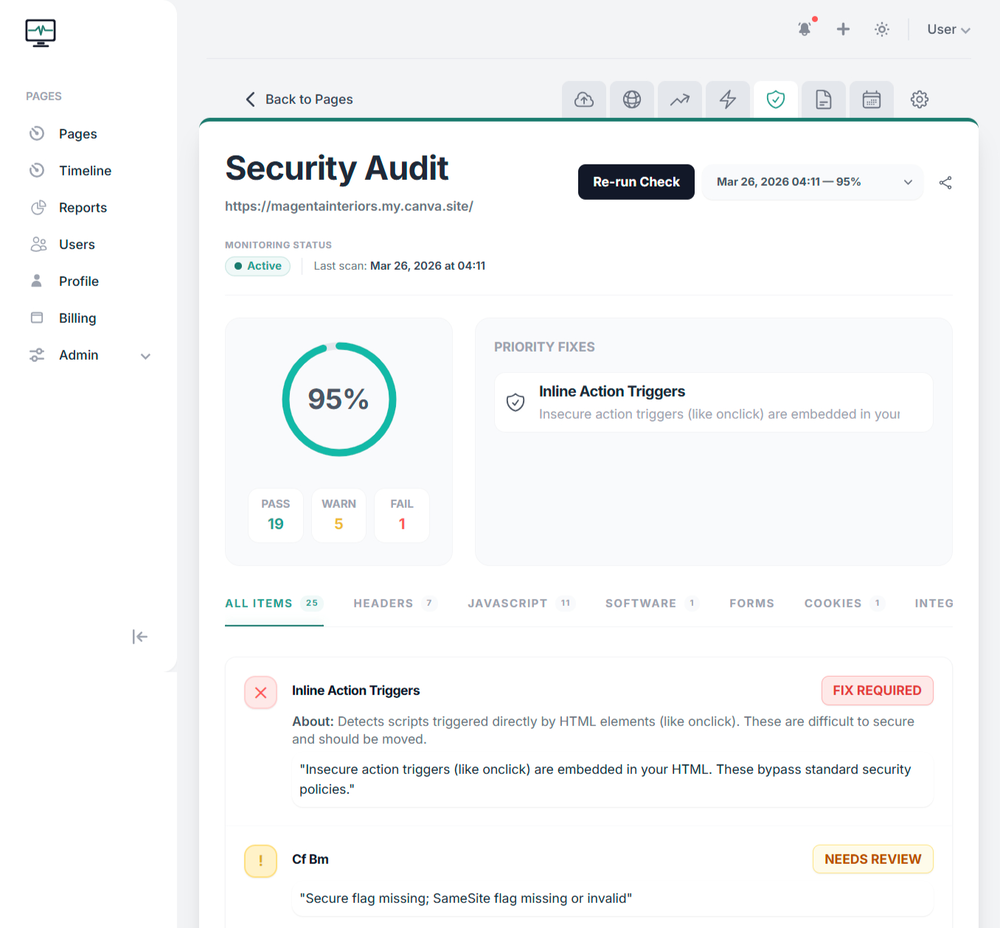
When you add a page, SiteVitals runs a full security scan and establishes a clear baseline. Every metric is scored and explained in plain language - no unexplained jargon, no alerts without context.

  • Baseline established across all seven security areas
  • Findings explained clearly, with severity and impact
  • Focused on actionable issues, not noise
2

Continuous Monitoring & Alerts

SiteVitals scans your pages on an ongoing basis and compares each result against the baseline. When something regresses or a new risk appears, you are alerted through your chosen channel.

  • Configurable alerts: email, in-app, webhooks
  • Alerts trigger on meaningful regressions
  • Issues prioritised by severity and impact
3

Zero Disruption to Your Site

SiteVitals works entirely from outside your infrastructure. Nothing is installed, nothing is modified, and monitoring has no impact on performance or visitor experience.

  • No plugins, agents, or server-side code
  • Works on live production sites from day one
  • Respects robots.txt and cookie behaviour

See SiteVitals in action

No screenshots here. This is a live, interactive report showing exactly how we monitor uptime.

sitevitals.co.uk/report/demo
Why It Matters

Security problems do not only
happen to big organisations.

The headlines cover the large-scale incidents. But the vulnerabilities behind them - misconfigured headers, outdated software, unmonitored third-party scripts - exist on sites of every size. The difference is usually not the sophistication of the attack. It is whether anyone was watching.

Manufacturing 2025

Jaguar Land Rover Cyberattack

Disruption to production & supply chain; analysts estimate UK-wide impact near £1.9 billion.

Operational disruption · Supply chain Source →
Retail 2025

Attacks on UK Retailers (M&S, Co-op, Harrods)

Ecommerce and payments disrupted; M&S paused online orders for over a week while responding.

Revenue loss · Customer impact Source →
Luxury/Retail 2025

Louis Vuitton Customer Data Breach

Names, contacts, and purchase histories exposed - a stark reminder that brand prestige ≠ immunity.

Data exposure · Trust risk Source →
Healthcare 2025

Barts Health NHS Trust Ransomware

Patient and staff information leaked to the dark web; emergency incident response and regulator involvement.

Ransomware · Compliance Source →
SaaS / Security 2025

LastPass UK Fined £1.2M

ICO penalty tied to a prior breach affecting 1M+ UK users - proof regulators act when basics fail.

Regulatory · Reputational Source →
SME Impact 2025

Breach Costs for UK SMEs

Average breach cost rising; many SMEs report losses between £10k–£75k per incident.

Financial · Business continuity Source →

These are high-profile examples - but the same principle applies at every scale. Downtime, security gaps, and technical SEO problems cost real money for businesses of every size. The only difference is that small businesses often feel the impact more acutely, and have fewer people watching for problems. That is exactly the gap SiteVitals is built to fill.

Avoid embarrassing and costly hacks costly hacks costly hacks

Security risks don’t always announce themselves. A single misconfigured header, expired SSL certificate, or forgotten plugin update can quietly turn your site into a warning screen. Even subtle injection attacks or mixed-content errors can cause browsers to flag your website as “Not Secure” - instantly damaging trust and conversions.

SiteVitals continuously scans your pages to detect these real-world issues before your customers or search engines do. From insecure cookies and exposed software versions to unsafe JavaScript and injected content, we help you catch problems early and respond fast.

Protect your reputation, your data, and your search visibility. Know when something changes - before it becomes an outage, a warning banner, or tomorrow’s support ticket.

Not sure whether there’s anything to worry about yet? Run a free website security scan to spot common risks before committing to continuous monitoring.

Avoid embarrassing and costly hacks

Security monitoring that costs less than a single emergency.

Get started with our free tools today. When you're ready for continuous security monitoring, our plans are simple, transparent, and built for sites of all sizes.

Plans start from
£2.50/mo
View All Plans & Features
Questions

Things people often ask us.

If something is not covered here, we are genuinely happy to answer it. We are a small team and we actually respond.

What is the most cost-effective way to manage website security risks?

The most cost-effective way to manage website security risks is through continuous monitoring rather than one-off audits or penetration tests. Ongoing monitoring helps detect real-world issues early, before they become costly incidents.

How can I monitor website security without paying for penetration testing?

You can monitor website security without penetration testing by continuously scanning live pages for common risks such as unsafe JavaScript, weak browser protections, exposed software, and content injection signals. This approach focuses on practical, real-world issues.

How do I know if my website has security issues?

Many website security issues do not cause obvious errors. Monitoring for changes in headers, scripts, content, cookies, and resource loading can help reveal risks that might otherwise go unnoticed.

What website security issues should I prioritise first?

Common high-impact website security issues include missing or misconfigured security headers, mixed content, unsafe JavaScript, insecure cookies, and exposed software versions. These issues can affect user trust, browser warnings, and search visibility.

Can website security issues affect SEO and user trust?

Yes. Security problems such as browser warnings, mixed content, or injected scripts can reduce user trust and negatively impact search visibility, even if the site appears to load normally.

How can I detect security changes on my website over time?

Detecting security changes requires comparing current page behaviour with previous scans. Continuous monitoring helps highlight regressions, unexpected changes, or increased risk levels as soon as they occur.

Do I need expensive security tools to manage website risks?

No. Many common website security risks can be identified through continuous monitoring of live pages for unsafe code, weak browser protections, exposed software, and unexpected changes, without relying on expensive enterprise tools or penetration testing.

Do I need to install plugins or software to monitor website security?

No. Website security monitoring can be performed externally by scanning live pages, without installing plugins, agents, or making changes to your website’s code.

Start with the free check. Know where you stand right now.

No account needed. No changes made to your site. Just a clear picture of what automated scanners - and potentially attackers - can already see about yours.