There's a version of SEO that most people did ten years ago and haven't revisited since. Put the keywords in the right places, get a few backlinks, make sure the title tag isn't empty. Job done. And for traditional search, that was largely enough.
AI-powered search doesn't work the same way. When ChatGPT, Perplexity, or Google's AI Overviews decide whether to cite your content, they're not just weighing keywords and authority. They're parsing your page structure, trying to understand what kind of page this is, where the primary content lives, who wrote it, when it was published, and whether the data inside it can be extracted cleanly.
That's where semantic HTML comes in. And it's why we've just shipped a new set of checks to the SiteVitals SEO monitor that go significantly further than anything we were doing before.
What is semantic HTML, and why does it matter for AI?
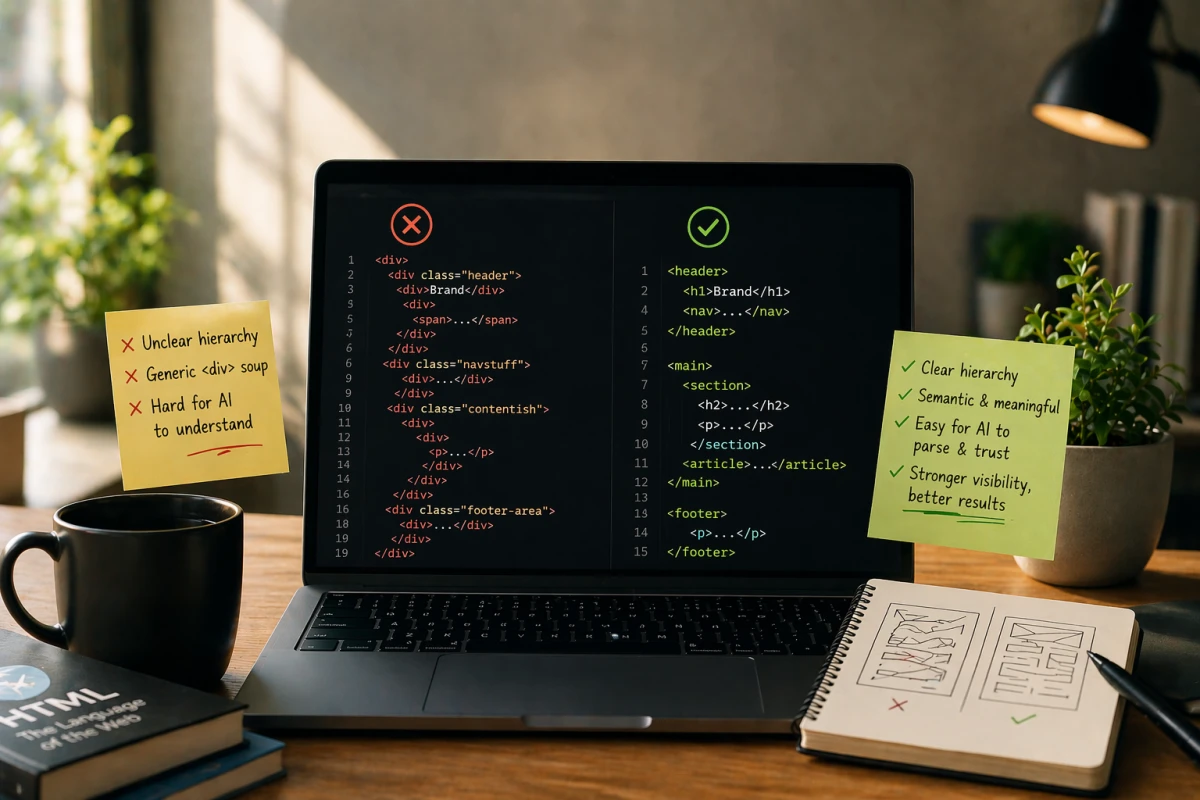
Semantic HTML means using the right element for the right job. It's actually not anything especially new, it's been around for ages. It's just that it's becoming increasingly important. A <nav> for navigation. A <main> for the primary content. An <article> for a discrete piece of content someone might want to read, share, or cite. A <time> element with a datetime attribute for dates.
For human visitors, a <div> styled to look like navigation and a proper <nav> element look identical. For an AI crawler (as well as assistive technologies) they are completely different things. One provides meaning. One is just a box.
AI systems parsing your page are doing something like: Is there a primary content zone I can trust? Is this content discrete and citable? How old is it? Who is responsible for it? Can I extract the key facts cleanly? Semantic HTML answers those questions directly. The absence of it means the AI has to guess — or ignore your page in favour of one where the structure is clearer.
The new checks, and what we're looking for
Does your page have a <main> landmark?
The <main> element tells AI crawlers — and screen readers — exactly where the primary content of the page begins and ends. Without it, a crawler has to infer where the navigation, header, footer, and sidebar end and where your actual content starts. That inference can go wrong, and when it does, your content either gets partially extracted or not extracted at all.
It's a single element, it costs nothing to add, and it makes a meaningful difference to how AI systems interpret your page. We now flag its absence as a warning on every page we scan.
Is your content wrapped in an <article> element?
The <article> element signals that a section of content is self-contained and independently distributable — a blog post, a news article, a product listing, a user review. It's the HTML equivalent of saying "this is a thing that stands on its own."
For AI citation systems, <article> is a strong signal that the enclosed content is citable. We also cross-reference it against your JSON-LD schema: if you've declared Article or BlogPosting in your structured data but there's no corresponding <article> element in your HTML, we flag that mismatch. The schema and the structure should tell the same story.
Do you have <nav>, <header>, and <footer> landmarks?
These might feel like table-stakes, but they matter for a specific reason: they allow AI systems to exclude non-content from their extraction. If your navigation links, site header, and footer are wrapped in proper semantic elements, a crawler can deprioritise them and focus on what's actually yours to say. If everything is a <div>, the crawler has no way to know what to ignore.
We check for all three and flag missing ones as warnings. None of them are difficult to add, and all of them make your content easier to extract cleanly.
Are your dates machine-readable?
This one is underestimated. AI systems use publication and modification dates as a freshness signal when deciding which sources to cite. A page that says "Updated April 2026" in human-readable text is useful to a reader. A page that uses <time datetime="2026-04-23"> is useful to a machine.
The datetime attribute on a <time> element gives AI systems an unambiguous, standardised date they can parse without having to interpret natural language. For article pages in particular, missing or malformed datetime attributes mean your freshness signals aren't being read — and in a world where recency matters for AI citation selection, that's a real disadvantage.
We now flag any <time> elements that are missing their datetime attribute, and warn when dates are absent from article-type pages entirely.
Do your images have <figure> and <figcaption>?
Alt text tells AI systems what an image depicts. A <figcaption> tells them why it matters — what role it plays in the surrounding content. That contextual relationship is something an alt attribute alone can't provide.
For AI systems that extract content for multimodal understanding, a properly captioned figure is significantly more useful than a bare <img> tag, however good the alt text is. We check the ratio of figures with and without captions, and flag uncaptioned images where the caption would add meaningful context.
Are your tables properly structured?
A table without <th> header cells is data an AI cannot reliably parse. It can see the values, but without headers it has no way to know what those values represent. We flag this as a fail rather than a warning. It's not just an AI readiness issue, it's a basic accessibility problem that also affects screen readers and search engine understanding.
We also check for <caption> elements, which describe what a table contains. A comparison table labelled "Pricing plans by feature" is far more useful to an AI extracting structured information than an unlabelled grid of ticks and crosses.
Are your blockquotes cited?
There are two valid ways to attribute a quotation in HTML. You can use the cite attribute on <blockquote> to link to a source URL — useful for citing articles, studies, or external references. Or you can use a <cite> element inside a <figure> or <figcaption> to name a person or publication, which is the right pattern for testimonials and attributed quotes.
We check for both patterns, and we don't penalise you for using the testimonial pattern when that's appropriate. What we do flag is a blockquote with no attribution at al, because an uncited quote is a weaker trust signal than one that names its source, whether that source is a URL or a person.
Are your <section> elements labelled?
A <section> without a heading or an aria-label is structurally almost identical to a <div>. The element implies a themed grouping of content, but without a label, AI systems can't determine what theme. We flag unlabelled sections as warnings, because a section that AI can't categorise is a section that contributes less to your page's interpretability.
Do your FAQ accordions have matching schema?
Many sites implement Q&A accordions using <details> and <summary> — a clean, accessible pattern that works well. The issue is that AI systems use FAQPage JSON-LD schema to identify FAQ content for rich results and direct citation. If you've built a visual accordion but haven't added the matching schema, you're getting the UX benefit without the discoverability signal.
We detect <details>/<summary> patterns and cross-reference them against your JSON-LD. If you have the pattern but not the schema, we tell you and point you toward adding the FAQPage markup that makes the connection explicit for AI systems.
Is prose content correctly marked up as paragraphs?
This is one of the most common issues on older sites and CMS-generated pages: substantial blocks of body copy sitting directly inside <div> elements rather than <p> tags. Visually, you'd never notice. Structurally, it matters.
AI systems use <p> as a signal that content is body copy worth extracting. Bare text inside a <div> is ambiguous. It could be a label, a UI element, a caption, or navigation text. We now identify <div> elements containing substantial direct text (20 or more words, filtering out obvious UI components and layout wrappers) and flag them as candidates for being replaced with proper paragraph elements.
How to see these checks on your site
All of these checks are now live in the SiteVitals SEO monitor. Every page you scan returns a Semantic HTML section alongside the existing checks for title tags, meta descriptions, schema, AI crawler access, and content structure. Each check shows pass, warning, or fail, and where something needs fixing, clicking the result tells you exactly what to change and why.
If you haven't run a scan recently, it's worth doing. Semantic HTML is the kind of thing that's easy to get right at the start and easy to let drift as a site grows. This is particularly easy if you're using a page builder, a CMS with flexible content fields, or an older theme that predates HTML5.
The sites that get cited by AI systems aren't necessarily the ones with the most backlinks or the highest domain authority. They're the ones that make it easiest for a machine to understand what's on the page, trust that it's authoritative, and extract it cleanly. Semantic HTML is a meaningful part of that, and it's something you can act on today.
Run a free SEO audit on your site and see where your semantic structure stands.

By Tom Freeman · Co-Founder & Lead Developer
Full-stack developer specialising in high-performance web applications and automated monitoring.
Share this post
Stay in the loop
Get new posts delivered to your inbox. No spam, unsubscribe any time.