From today, you can open Claude and ask: which of my sites have issues? And get a real answer, pulled live from your SiteVitals account.
No dashboard login. No tab-switching between clients. No staring at a score and trying to remember whether 74 is worse than last month. Just a question, and a plain-English answer about your actual sites.
This is possible because we have built an MCP server for SiteVitals. If you have not come across MCP before, the short version is this: it is an open standard, introduced by Anthropic in November 2024, that lets AI tools like Claude connect directly to external data sources and use real data when answering your questions. Instead of Claude knowing about websites in general, it now knows about your websites specifically.
Here is what that looks like in practice.
What you can ask Claude
The best way to explain this is to show it. These are real things you can ask once your SiteVitals account is connected.
If you manage multiple sites:
- Which of my sites have issues this week?
- Are any of my sites currently down?
- Which site has the worst performance score right now?
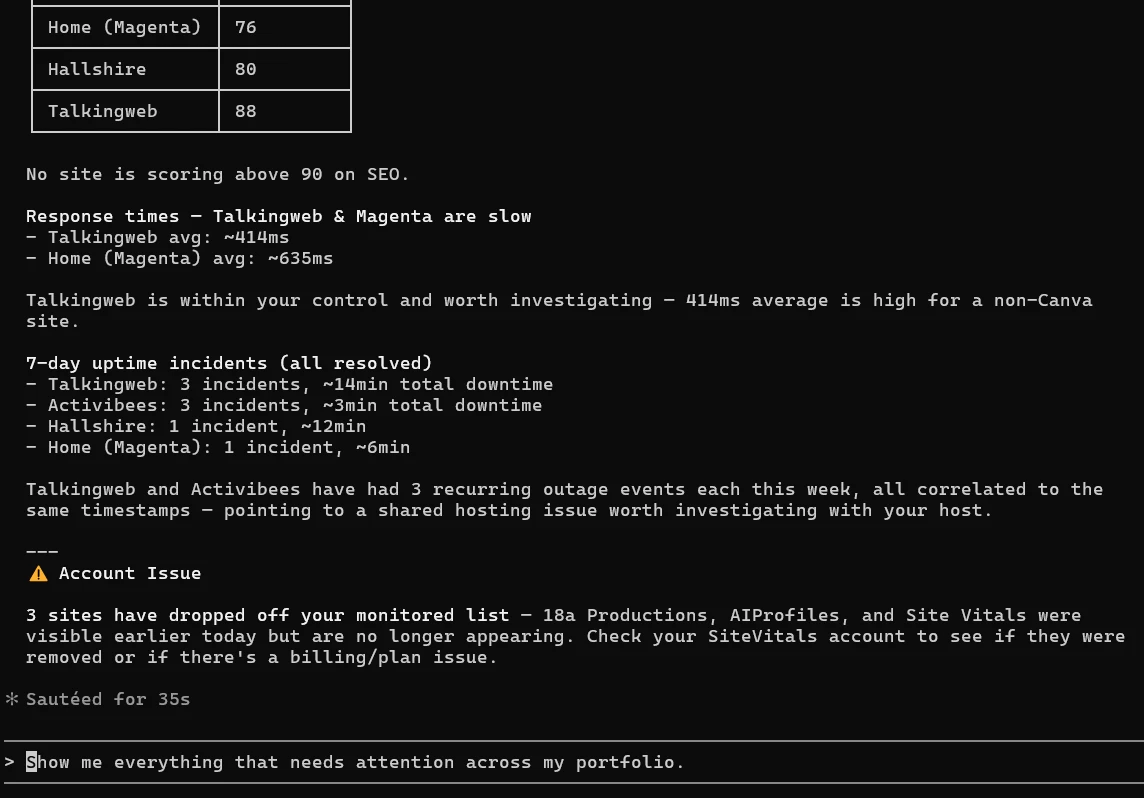
- Show me everything that needs attention across my portfolio.
If you are monitoring a single site:
- Is my SSL certificate going to expire soon?
- What SEO problems does my site have?
- How has my uptime been over the last 30 days?
- What were the security issues found in the last check?
If you are more technical:
- Give me the Core Web Vitals from my last pagespeed check.
- Show me all downtime incidents in the last 7 days.
- What is the security score trend for my main site?
Claude does not guess at the answers. It calls your SiteVitals data directly, reads the actual check results, and tells you what it finds. The difference between that and a general-purpose AI answering a question about websites is the difference between asking a doctor about symptoms you have described and handing them your test results.
What data is available
The MCP connection gives Claude access to all of your monitored sites and their current health scores, detailed breakdowns per site across SEO, security, speed, integrity, uptime and content, your uptime history and downtime incidents with availability percentages, the specific issues found in your latest checks, and your SSL certificate and domain expiry status with urgency flags.
Everything is read-only. Claude can tell you what it finds. It cannot change anything.
Your data remains scoped to your account. Claude sees exactly what you would see if you logged in - no more, no less.
How to connect SiteVitals to Claude
The connection uses Claude Code - Anthropic's command-line tool, which is free to install and has full support for the OAuth authentication that the SiteVitals MCP server uses. The whole process takes about five minutes.
Step 1. Install Claude Code by following the instructions at claude.ai/code. You will need Node.js on your machine first - if you do not have it, nodejs.org has a straightforward installer.
Step 2. Run this command in your terminal:
claude mcp add --transport http sitevitals https://www.sitevitals.co.uk/api/mcpStep 3. Launch Claude Code by running claude in your terminal, then type /mcp and select Authenticate. Your browser will open to a SiteVitals authorisation screen.
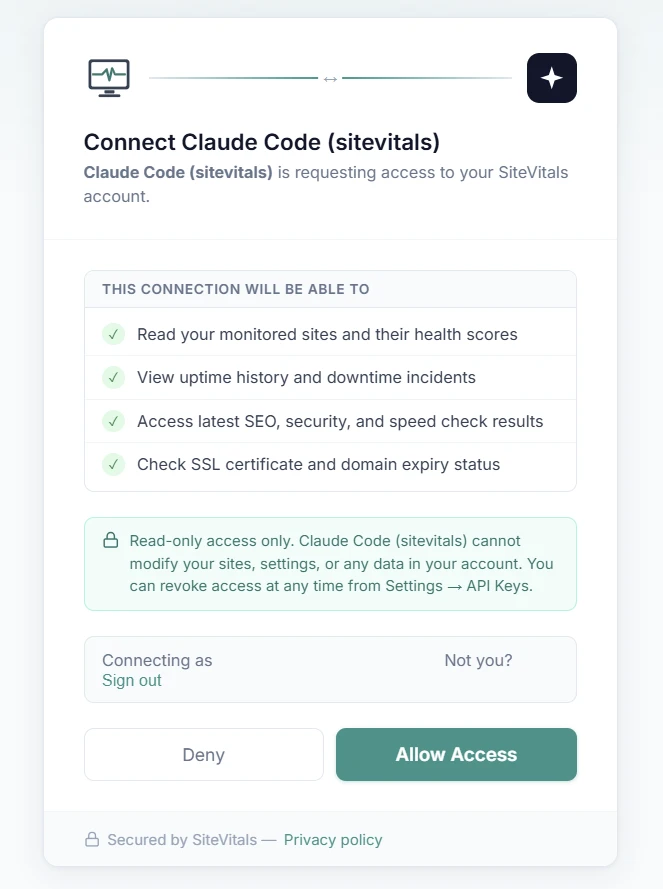
Step 4. Log in to your SiteVitals account if prompted, then click Allow Access. You will be redirected back to Claude Code, which will confirm the connection is active.
Step 5. Start asking questions. Claude now has live access to your SiteVitals data.
> Are my sites online? Tell me about recent uptime incidents.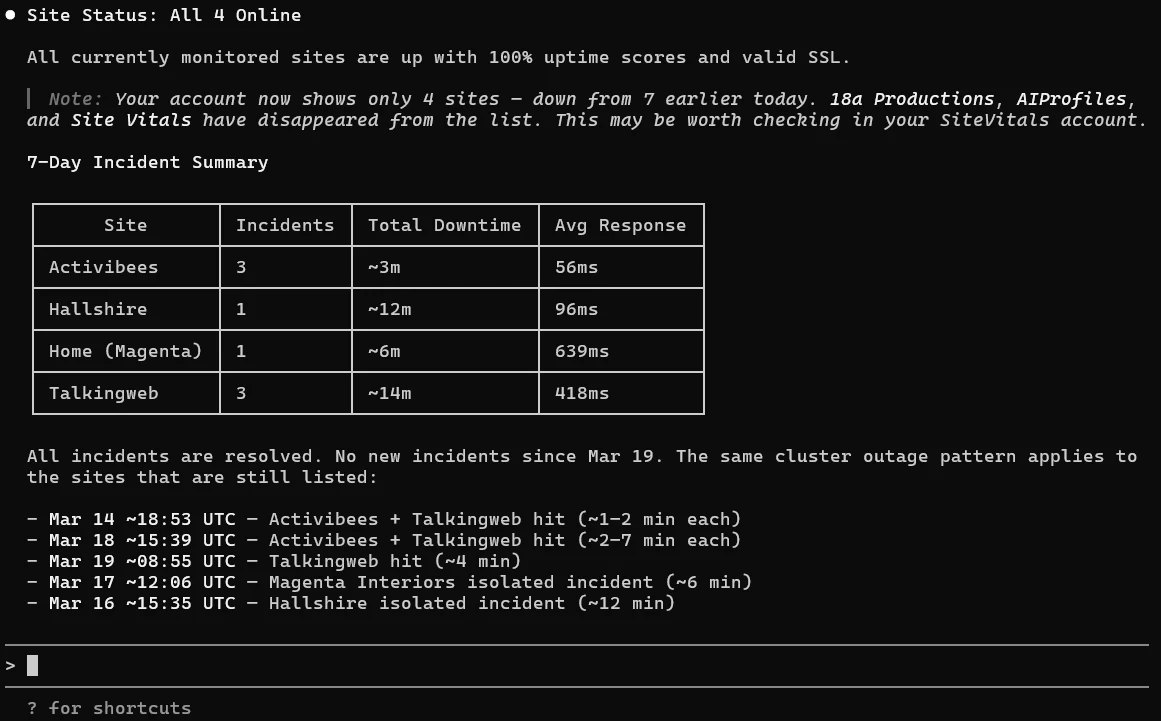
> Show me everything that needs attention across my portfolio.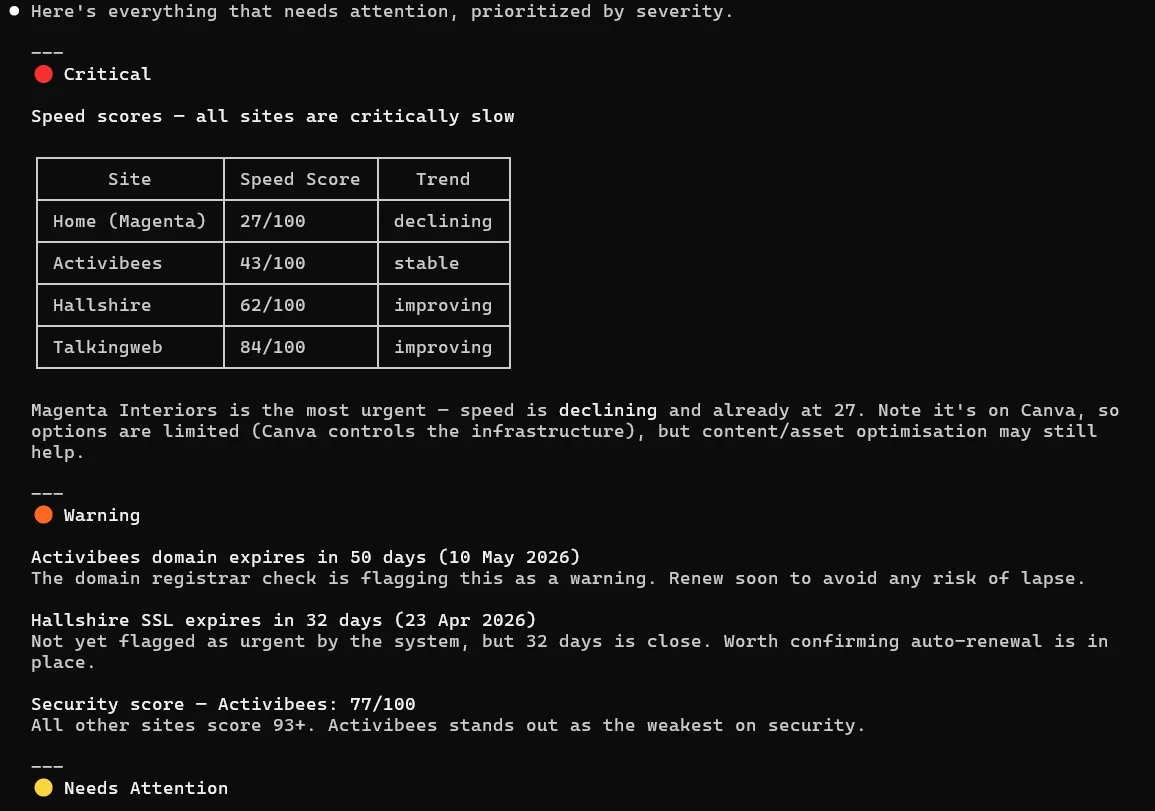
Full setup instructions, including details for the claude.ai web interface (currently in beta), are available on the Claude MCP settings page in your account.
Why this is useful even if you already use the dashboard
The dashboard is not going anywhere. For detailed investigation - looking at a specific check result, drilling into pagespeed recommendations, reviewing your timeline - it is the right tool.
But there is a category of interaction that a dashboard is not well suited to: the quick check. The Monday morning scan. The client call where someone asks how things are looking. The moment where you want a status update without committing to a full login and review.
That is where a conversational interface earns its place. Not because it replaces the dashboard, but because it removes the friction from the interactions that did not really need a dashboard in the first place.
Agencies with multiple client sites will feel this most acutely. Checking ten sites sequentially in a dashboard is a workflow. Asking which of my sites need attention this week? and getting a consolidated answer is a different kind of thing entirely.
A note on how we built this
We built the MCP server directly inside our existing Laravel application rather than as a separate service. It runs on the same infrastructure as everything else and required no new servers or dependencies.
Authentication uses OAuth 2.1 - the same standard used by services like GitHub and Google when they ask you to authorise a connection. When you connect Claude Code, you are taken through a proper authorisation flow rather than copying and pasting API tokens. Your credentials never leave SiteVitals, and you can revoke access at any time from your account settings.
We mention this not to be interesting about the implementation, but because it matters for reliability and security. There is no additional service to go down, no token to accidentally expose, and no extra moving parts between Claude's question and your data.
If you are curious about the technical decisions behind this, we have written about them in more detail on the 18a Productions blog.
What is coming next
This is the first version. It is read-only and covers the core monitoring data. We are planning to add a portfolio summary tool designed specifically for agencies, the ability to pull monthly report data conversationally, and access to content change history.
We will also be watching how people actually use this before deciding what to build next. If there is a question you want to be able to ask that is not currently answerable, let us know.
Get started
If you are already a SiteVitals user, head to Settings → Developer Tools → Claude MCP for the full setup guide.
If you are not yet using SiteVitals, you can start a free trial and have the MCP connection working the same day. The connection works on all plans.
Further reading
- View our official docs
- Introducing the Model Context Protocol - Anthropic's original announcement from November 2024, explaining why they built MCP and what problem it solves.
- modelcontextprotocol.io - The official MCP documentation site, maintained by Anthropic. Covers the specification, getting started guides, and a directory of existing MCP servers.
- Model Context Protocol - Wikipedia - A good neutral overview of MCP, its origins, adoption by OpenAI and others, and where the standard is heading.
- Claude Code - Anthropic's command-line tool for working with Claude. Free to install and the recommended way to connect SiteVitals right now.
- 18a Productions blog - The technical story behind how we built the SiteVitals MCP server in Laravel, including the architectural decisions and OAuth implementation.

By Tom Freeman · Co-Founder & Lead Developer
Full-stack developer specialising in high-performance web applications and automated monitoring.
Share this post
Stay in the loop
Get new posts delivered to your inbox. No spam, unsubscribe any time.