Security monitoring

Most security problems don’t announce themselves.

They tend to build up over time: a missing browser security setting, a server that shows anyone which software version it's running, or a new third-party script on your page. Your site can look and load perfectly while still leaving gaps, like one that lets someone hide your page inside theirs to trick visitors into clicking things (clickjacking). SiteVitals keeps checking for these weak spots and tells you when it finds one.

External, read-only monitoring. Nothing installed on your site.

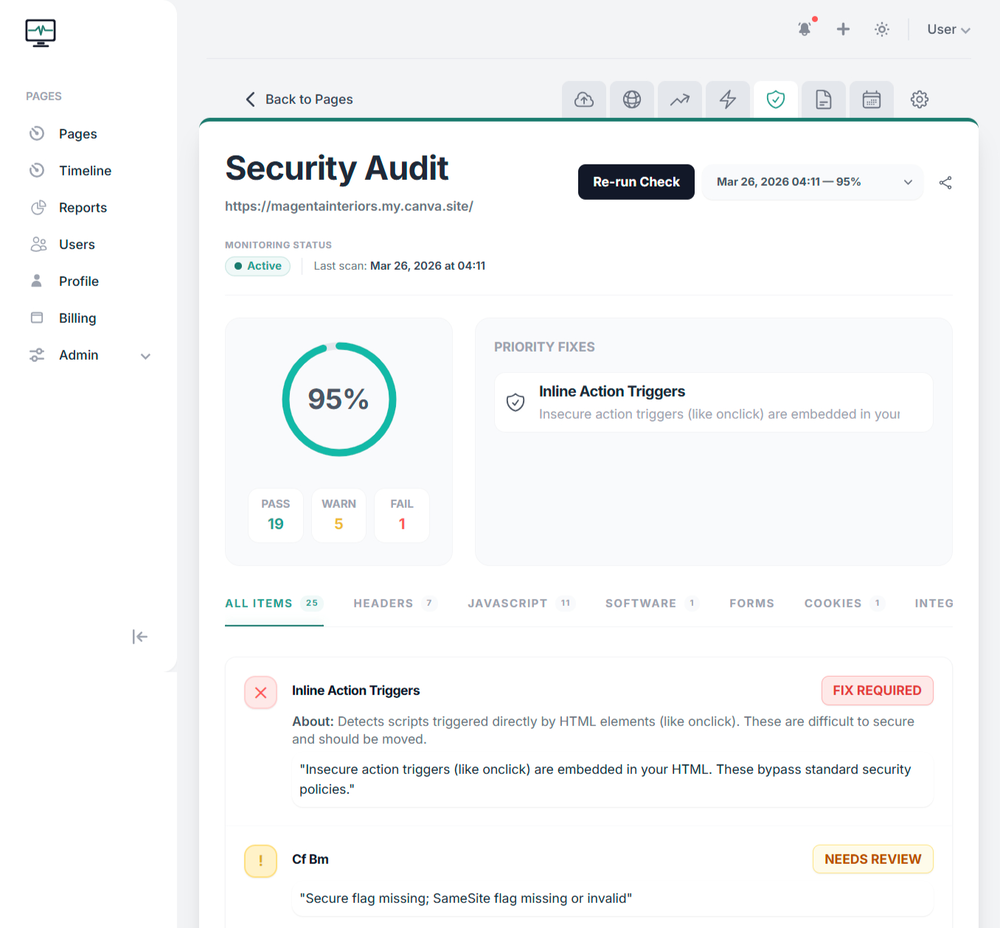
SiteVitals security monitoring dashboard

What continuous monitoring covers

Seven areas of your site's security, checked every time we scan.

These seven areas map directly to the seven security scanners SiteVitals currently runs. We group the individual findings so you can understand the risk without having to decipher a long list of raw checks.

01

Browser security & HTTP headers

Checks the instructions your server gives the browser, including protections against clickjacking, unsafe content execution and other common browser-level weaknesses.

Includes

  • ↪ Content Security Policy (CSP)
  • ↪ HSTS
  • ↪ X-Frame-Options
  • ↪ MIME sniffing protection
  • ↪ Permissions and cross-origin policies

02

Cookies & session handling

Checks whether cookies are configured with the protections browsers provide for keeping session data away from scripts and inappropriate cross-site requests.

Includes

  • ↪ Secure flag
  • ↪ HttpOnly flag
  • ↪ SameSite settings
  • ↪ Cookie scope
  • ↪ Partitioned / CHIPS handling where relevant

03

JavaScript risk & unsafe patterns

Looks for risky JavaScript patterns and suspicious inline code that can indicate unsafe implementation or something worth investigating.

Includes

  • ↪ Dynamic code evaluation
  • ↪ Dangerous JavaScript APIs
  • ↪ Suspicious inline scripts
  • ↪ Obfuscated or unusual patterns

04

Mixed content & insecure resources

Checks whether an HTTPS page is still pulling scripts, styles, images or frames over an insecure connection.

Includes

  • ↪ Insecure scripts and styles
  • ↪ Insecure iframes
  • ↪ Mixed-content resource loading
  • ↪ Upgrade-insecure-request signals

05

Page integrity & injection signals

Looks for patterns that can indicate injected or unexpected page content, including things which may not be obvious when someone simply visits the site.

Includes

  • ↪ Hidden iframes
  • ↪ Meta-refresh redirects
  • ↪ Malvertising-style patterns
  • ↪ Markup anomalies

06

Forms & injection indicators

Reviews forms for security-relevant patterns and submission behaviour, particularly around login, password and user-input surfaces.

Includes

  • ↪ Password handling
  • ↪ Reflected URL parameters
  • ↪ Input-handling patterns
  • ↪ Third-party form endpoints

07

Software exposure & known vulnerabilities

Identifies software and server information exposed by the page, then uses version information where available to surface known vulnerabilities.

Includes

  • ↪ Server and framework fingerprinting
  • ↪ CMS and generator tags
  • ↪ Version disclosure
  • ↪ Known vulnerability / CVE matching

See it in action

Explore a real security report.

This is an actual SiteVitals security report, not a screenshot. Open the findings, see what was checked and how the report explains the things worth paying attention to.

live security report

The free check gives you a report like this for your own page. Continuous monitoring keeps repeating the checks so you can see when something changes.

Check your own site

How security monitoring works

The useful bit is noticing when something changes.

SiteVitals scans your live pages from the outside, so there is no plugin, agent or monitoring script to install. The first scan gives you a baseline; later scans let you see whether a protection has disappeared, a new risk has appeared or exposed software information has changed.

That matters because many of these issues are regressions. A header can disappear after a configuration change. A plugin can expose information that was previously hidden. A third-party dependency can alter without anybody changing your own code.

Findings are scored and explained in the report so you can decide what actually needs attention, rather than treating every technical observation as an emergency.

Security monitoring that costs less than a single emergency.

Get started with our free tools today. When you're ready for continuous security monitoring, our plans are simple, transparent, and built for sites of all sizes.

Plans start from
£2.50/mo
View All Plans & Features

Things people ask us

If something isn't covered here, just ask us. We're a small team and we answer our own emails.

No. SiteVitals performs an external, read-only scan of publicly available pages and response data. It does not attempt to exploit vulnerabilities, bypass authentication or interfere with your website.
SiteVitals currently runs seven security scanner areas covering browser and HTTP headers, cookies and session handling, JavaScript risks, mixed content, page integrity and injection signals, forms, and software exposure with known-vulnerability matching where version information is available.
Yes. Missing browser protections, exposed version information, insecure cookie settings and suspicious code patterns can exist without changing how the page looks to a normal visitor.
Clickjacking is when another site embeds your page inside its own interface and tricks a visitor into clicking something they did not intend to. Browser security headers such as X-Frame-Options and Content Security Policy can help protect against this.
Where SiteVitals can identify exposed software or version information, it can compare that information with known-vulnerability data and surface relevant risks. A website cannot always be fingerprinted reliably, so this is one part of the wider security scan rather than a complete inventory of every component on the server.
Because security configuration can regress. Headers can disappear, scripts can change and software information can become exposed after routine updates or configuration changes. Repeated scans give you a history and make those changes easier to spot.
No. SiteVitals checks your public pages externally. There is no plugin, agent or monitoring script to install.

Free security snapshot

See what an external scanner can spot about your site right now.

The free security check takes a read-only look at your public page and reports the kinds of browser protections, exposed software information and other security signals an automated scanner can see.

It is not a penetration test and it does not attempt to exploit anything. Nothing is installed or changed on your site.

Want SiteVitals to keep checking? Start continuous monitoring ↗