A lot of what keeps a website working is stuff you never see. The domain name has to stay registered, the settings that point it at your server have to stay right, the security certificate has to stay valid, and all the little files the page pulls in have to keep loading. When they're working, nobody thinks about them (and honestly, nobody should have to). But they're also the things that tend to go wrong in the most annoying way - a renewal email lands in an inbox nobody checks any more, or a file gets moved and half the page loses its styling.
That's what the Integrity report is for. It puts those underlying bits in one place so you can see they're intact, and spot anything heading for trouble before it turns into an emergency. A certificate renewal caught three weeks out is a five-minute job. The same issue discovered by a customer is a very different kind of afternoon.
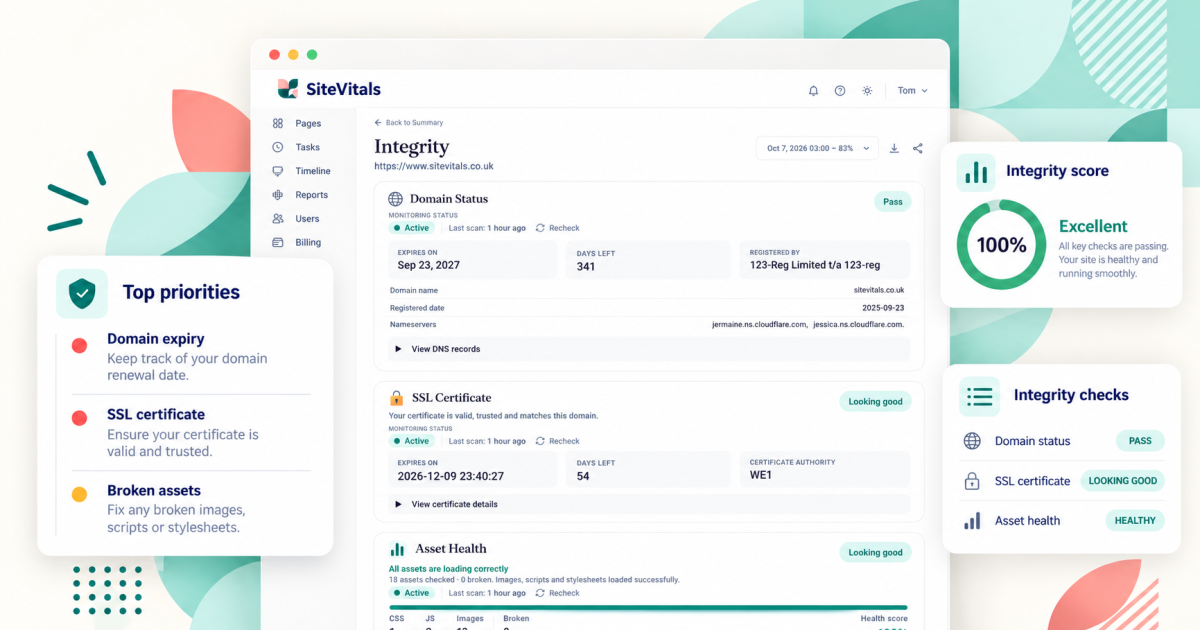
The report has three sections, and this article goes through each one:
- Domain Status - your domain registration, nameservers and DNS
- SSL Certificate - the certificate that makes https work
- Asset Health - the images, stylesheets and scripts your page needs
Integrity isn't the same as uptime
It's worth clearing this up first. Uptime monitoring asks "does the website respond?" Integrity asks "are the things it depends on still intact?" Those aren't the same question.
Your page can load perfectly well while an image, stylesheet or script on it is failing, so an uptime check would say everything's fine. And a domain that runs out next month, or a certificate that's about to expire, won't show up at all just by looking at your homepage today. Everything looks normal right up until it isn't.
The bits at the top of each section
Each section shows a monitoring status (such as Active), when it was last scanned and, where it applies, a Recheck button so you can run the check again yourself - handy if you've just fixed something and want to see it go green.
There's a free one-off integrity check you can run on any site, but the real value is in monitoring over time. On a paid plan SiteVitals keeps checking, so it's spotting changes and problems as they come up rather than giving you a snapshot of one moment.
Domain Status
Domain names aren't bought outright. You register them for a set period and renew them, through a company called a registrar (the business you pay for your domain - GoDaddy, 123 Reg, Namecheap and so on). This section shows what SiteVitals has found out about your domain's registration:
- whether the domain check passes
- the domain name itself
- the expiry date, and how many days are left
- the registrar
- the date it was first registered, where that's available
- the nameservers
Why the expiry date matters
If a domain expires, your website and anything else that relies on that domain (your email, very often) can stop working. And it's one of those problems that tends to come out of nowhere, because the renewal reminders go to whoever registered the domain, which might be a former employee, an old agency or an email address you stopped checking years ago.
(Couldn't you just register it again? Well yes, if it's still available and nobody else has swooped in first... but that's not a gamble you want to take with the address your whole business lives at.)
So the useful part isn't knowing the domain is fine today. It's seeing the number of days remaining and having plenty of warning before it gets close. To be clear, SiteVitals doesn't renew your domain or have any access to your registrar - we report what we can see, and the renewing is down to you or whoever manages the domain.
Nameservers
Nameservers tell the internet where your domain's DNS is managed. DNS is basically the internet's address book - it's how typing your web address finds the right server, and how emails to your domain end up in the right inbox. Your nameservers might point at your registrar, your hosting company, or a service like Cloudflare.
You don't need to do anything with them day to day, but they're really useful when something needs fixing, because they tell you where DNS changes need to be made. If you've ever had the "who actually controls our domain settings?" conversation, this answers it.
View DNS records and View Raw & Appended Data
Under the main details there are two expandable sections. View DNS records shows the individual records set up for your domain, and View Raw & Appended Data shows the underlying data we've collected. They're there for developers, or anyone who needs the detail while troubleshooting. If everything's healthy, you can leave them closed.
SSL Certificate
An SSL certificate (you'll also see it called TLS, which is the newer name for the same thing) is what lets visitors make a secure https connection to your website. It encrypts what's sent between their browser and your site, and it helps the browser check that it's really talking to your domain. It's the thing behind the padlock in the address bar.
SiteVitals checks the certificate your site is presenting and shows you:
- the overall status (when all's well, something like "Looking good")
- when the certificate expires, and how many days are left
- the certificate authority (the organisation that issued it)
- an expandable View certificate details section with the technical detail
In a healthy report you'll see "Your certificate is valid, trusted and matches this domain." That one sentence covers three separate things - that it hasn't expired, that browsers trust whoever issued it and that it's for the right web address.
What can go wrong
A site can look completely fine today and still have a certificate problem on the way. The certificate might be getting close to its expiry date, it might be set up incorrectly, it might fail validation, or it might not match the address people are visiting (covering www.yoursite.com but not yoursite.com, for example). When a certificate problem does hit, browsers show visitors a full-page security warning, and most people take one look and leave.
Lots of hosting companies renew certificates automatically, which is great, but automatic renewals can fail without anyone noticing. As with domains, SiteVitals doesn't issue or renew certificates itself. It checks what your site is presenting and tells you what it finds.
Asset Health
A web page isn't one single file. When someone opens it, their browser also pulls in a whole collection of other files - images, stylesheets (the files that control how the page looks) and JavaScript (the code that makes things interactive, like menus, sliders and forms). Each of those is called an asset.
If one of those assets stops loading, the page itself can still load fine, but part of it breaks. You might get:
- a missing image
- styling that disappears or looks wrong
- a menu, form or other interactive bit that stops working because a JavaScript file failed
SiteVitals goes through the assets your page references and checks whether each one loads successfully. The dashboard shows how many were checked and how many are broken, grouped into CSS stylesheets, JavaScript, images and broken assets, along with a health score.
For example, on one report we checked 18 assets - 1 stylesheet, 3 JavaScript files and 13 images - with 0 broken and a health score of 100%. So the dashboard said "All assets are loading correctly."
You'll also see HTTP response status information, like 200. That's the code a server sends back when the browser asks for a file, and 200 simply means "here you go, it worked." Codes that aren't successful are what land an asset in the broken pile.
One thing to keep in mind about the health score. It's a quick summary of whether the assets we checked on that scan loaded properly, so 100% means those assets on that page were all fine. It doesn't mean your whole website is perfect, and it doesn't cover the other things SiteVitals checks, like speed or SEO.
If something's flagged
Most of the time, the Integrity report is the one you glance at and move on from. When something does need attention, here's roughly where to start:
- Domain getting close to expiry - log in to your registrar (or ask whoever manages the domain), check auto-renew is switched on and the payment card hasn't expired, and make sure the contact email is one somebody reads
- Certificate problem - pass it to your host or developer, as certificates are almost always handled on the server
- Broken assets - pass it to whoever looks after your site so they can find the missing or failing files
You can also set up alerts for domain expiry, SSL certificate expiry, DNS record changes and broken assets (depending on your plan), so you hear about these without having to check.
And if anything on the report doesn't make sense, drop us a line and we'll explain it (and probably add it here too).

By Tom Freeman · Co-Founder & Lead Developer
Full-stack developer specialising in high-performance web applications and automated monitoring.
Share this post
Stay in the loop
Get new posts delivered to your inbox. No spam, unsubscribe any time.